
How to Write a Perfect Blog Article - Rules and Guidelines
Writing a perfect blog article is both an art and a science. It’s not just about putting words on a page; it’s about creating something people actually want to read, share, and remember. Every year, millions of blog posts go live, but only a few stand out.
The difference often comes down to how well they are written, structured, and optimized.

If you’re trying to reach readers especially those who aren’t native English speakers—clarity is key. Clear writing makes your message easy to understand. Short sentences help your readers follow along. Simple words ensure your ideas aren’t lost in translation. But there’s more: you also need to grab attention, keep people interested, and deliver real value.
In this guide, you’ll learn step-by-step how to write a blog article that isn’t just good it’s perfect. You’ll see practical tips, real examples, and strategies that top bloggers use. Whether you’re new to blogging or looking to improve, you’ll discover insights that can transform your writing and help your blog grow.
Let’s dive in.
Understanding Your Audience
Before you write a single word, you must know who you’re writing for. This is the foundation of any great blog article. If you skip this step, your article can miss the mark, no matter how well written it is.
Why Audience Matters
Writing without thinking about your audience is like speaking to an empty room. You need to understand what your readers care about, their struggles, and how they talk. If your readers are non-native English speakers, you should use simple language and avoid idioms that might confuse them. If your readers are industry experts, you can use technical terms and deeper insights.
The way you write, the examples you choose, and the tone you use all depend on your audience. For example, a blog post for teenagers will sound different from one aimed at professionals in finance. If you try to write for everyone, you end up reaching no one.
Defining your audience helps you focus your article and make it truly useful.
Knowing your audience also guides your research and content depth. If your audience has little knowledge about a subject, you need to explain basic terms. If they’re advanced, you can dive deeper into complex strategies. This match between your writing and your audience’s level makes your content resonate and keeps readers coming back.
How To Find Out Who Your Audience Is
- Analyze Your Blog Stats: Look at your blog’s analytics. Which countries are your readers from? What languages do they speak? How old are they? Most analytics platforms, like Google Analytics, show user location, device, and even what time of day your readers visit.
- Ask Questions: Run surveys or ask for feedback. What topics do your readers want to learn about? What problems do they have? Simple forms or polls at the end of your articles can give you real insights.
- Social Media Listening: Check comments and discussions on your social channels. What words do people use? What questions do they ask? Notice the language and tone they use—this can help you mirror their communication style in your writing.
- Reader Personas: Try to create simple reader personas. For example: “Maria, 28, lives in Brazil, wants to start a travel blog, reads mostly on her phone.” These simple profiles guide your language and content choices.
- Join Online Groups: Participate in forums or Facebook groups related to your niche. You’ll see real questions and problems people face. This can spark ideas for future articles and show you what language your readers use.
Practical Example
Imagine you run a travel blog. If your readers are mostly from Southeast Asia, use examples and references they relate to. If you notice many questions about visa processes, you might need to explain those steps clearly.
If you see that your audience is young professionals interested in budget travel, you might focus on “How to Travel Europe for $30 a Day” instead of luxury travel tips. On the other hand, if your analytics show your readers are retirees, you could write about “Best Senior-Friendly Destinations in Asia.
”
Non-obvious insight: Many beginners forget to check what devices their readers use. If most readers are on mobile, short paragraphs and easy navigation matter even more. It’s easy to overlook, but content that looks good on desktop might be hard to read on a phone. Always test your articles on different devices.
Another detail: pay attention to your readers’ time zones. Publishing at the right time can increase engagement, especially if your audience is global.
Choosing The Right Topic
Picking the right topic can make or break your article. It’s not enough to write about what interests you; you need to write about what interests your audience.
What Makes A Topic Perfect?
- Relevant: Matches your audience’s needs and interests. If your readers are interested in digital marketing, don’t write about gardening unless you connect the two.
- Specific: Narrow topics are often better than broad ones. Instead of “Travel Tips,” try “How to Pack Light for a Two-Week Trip.”
- Timely: Covers current trends or events. If something big is happening in your industry, write about it now.
- Unique: Offers something new or a fresh perspective. Don’t just repeat what’s already online; add your own stories, opinions, or research.
A good topic solves a problem or answers a question. Think about what keeps your readers up at night. What challenges do they face? What can you help them with today?
Finding Topics That Work
- Keyword Research: Use tools like Google Keyword Planner or Ahrefs. Look for keywords with good search volume and low competition. For example, “best blogging platforms for beginners” might have less competition than “blogging tips.”
- Trending Topics: Check Google Trends or Twitter. What are people talking about right now? If you see a sudden rise in “remote work tools,” that could be your next article.
- Competitor Analysis: See what similar blogs are writing about. Find gaps or areas where you can add your own insight. Don’t copy—improve.
- Reader Requests: If you get questions from your audience, turn them into blog topics. An email asking, “How do I start a podcast?” could become a step-by-step guide.
- Evergreen Content: Look for topics that are always relevant, like “How to Save Money” or “Beginner’s Guide to Meditation.” These articles bring readers over time.
- Seasonal Content: Write about holidays, events, or yearly trends. For example, “Best Ways to Stay Productive in the New Year” in January.
Example Of Topic Selection
Suppose your readers are beginners in digital marketing. Instead of “SEO,” a broad topic, you might write about “How to Build Backlinks for New Websites. ” This is specific, actionable, and matches your readers’ needs.
Or, if your audience is interested in healthy eating, instead of “Nutrition Tips,” write “5 High-Protein Breakfasts for Busy Mornings. ” The more specific your topic, the easier it is to write a helpful, focused article.
Non-obvious insight: Many bloggers forget to check if their chosen topic has enough depth for a full article. Shallow topics often lead to weak posts. Before you start writing, make a simple outline. If you can’t think of enough points, choose a deeper topic or add a unique angle.
Also, check if the topic has already been covered many times. If so, think about how you can make your article different, such as by adding personal experiences, new data, or a unique viewpoint.
Crafting A Compelling Headline
Your headline is the first thing people see. If it’s not interesting, people won’t click. A strong headline grabs attention, explains what the article is about, and sets expectations.
Key Elements Of A Great Headline
- Clear: Readers should know what the article covers. Avoid vague titles.
- Specific: Numbers, timeframes, or benefits add clarity. “7 Ways to Save Money” is better than “Saving Money Tips.”
- Powerful Words: Use words like “best,” “easy,” “proven,” or “ultimate.” These words promise value.
- SEO-Friendly: Include main keywords naturally. This helps your article show up in search results.
- Short and Sweet: Aim for 8–12 words. Long headlines can get cut off in search results or social media shares.
- Emotion or Curiosity: Words like “secret,” “mistakes,” or “surprising” create curiosity. But don’t over-promise.
Examples Of Strong Headlines
- “10 Easy Steps to Start a Blog in 2024”
- “How to Lose Weight Fast: 7 Simple Changes Anyone Can Make”
- “The Ultimate Guide to Remote Work for Beginners”
- “5 Common Mistakes New Freelancers Make (and How to Avoid Them)”
- “What I Learned After Writing 100 Blog Posts in One Year”
Tools For Headline Improvement
- CoSchedule Headline Analyzer: Rates your headline based on length, word choice, and readability. It also gives suggestions for improvement.
- Sharethrough Headline Analyzer: Gives feedback on engagement and clarity.
- Answer the Public: Shows questions people are searching for—these can spark headline ideas.
Try writing 5–10 headlines for each article. Let them sit for a while, then pick the strongest one. Even experienced bloggers rarely use their first idea.
Non-obvious insight: Headlines with questions (“How do I…?”) often get more clicks, but they should promise a clear answer. Also, including a benefit (“…to Double Your Traffic”) makes headlines more compelling. If your headline doesn’t make someone curious or promise a result, try again.
Another trick: read your headline out loud. If it sounds awkward or confusing, rewrite it. Simple, clear headlines work best.
Planning Your Article Structure
A perfect blog article is well-organized. Good structure helps readers find information quickly and keeps them engaged. It also improves SEO.
Common Blog Article Structures
- List Articles: “Top 10 Ways to…” or “7 Best Tools for…” Lists work because they’re easy to scan and promise specific value.
- How-To Guides: Step-by-step instructions. Readers love clear, actionable guides.
- Problem/Solution: Introduce a problem, then show how to solve it. This works well for troubleshooting topics.
- Comparisons: Compare products, methods, or ideas. Readers like to see options side-by-side before making decisions.
- Storytelling: Begin with a personal story and then explain the lesson or tips. This structure is engaging for personal or motivational topics.
- Case Studies: Show a real example, what happened, and what you learned. These articles are powerful for building trust.
Example Structure For A How-to Article
- Headline
- Introduction
- Step 1: Define the Problem
- Step 2: Gather Resources
- Step 3: Take Action
- Step 4: Measure Results
- Bonus Tips
- FAQ
- Closing
Each section should be clear and focused. If your article is longer, add a summary or key takeaways at the end.
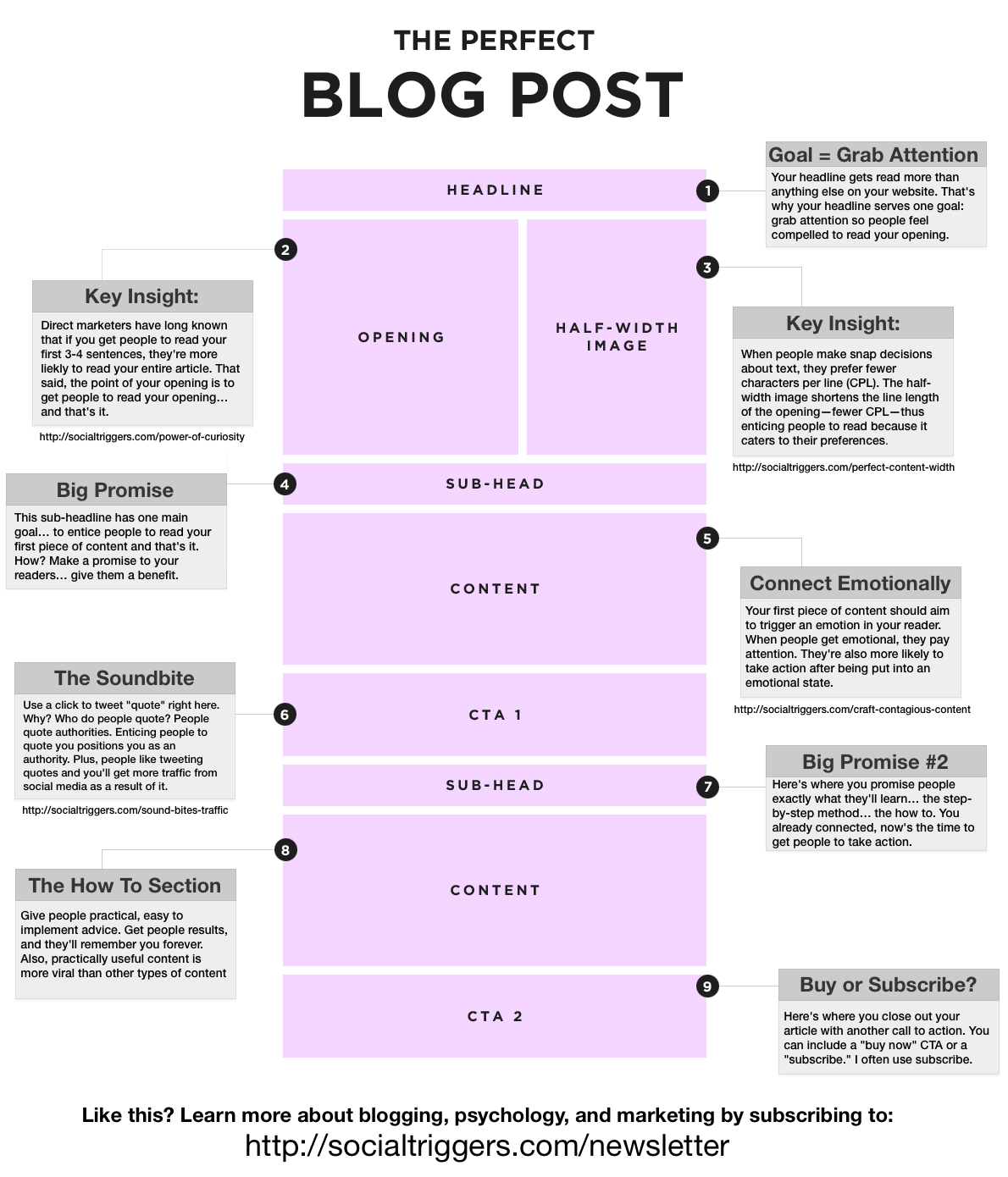
Visual Structure Matters
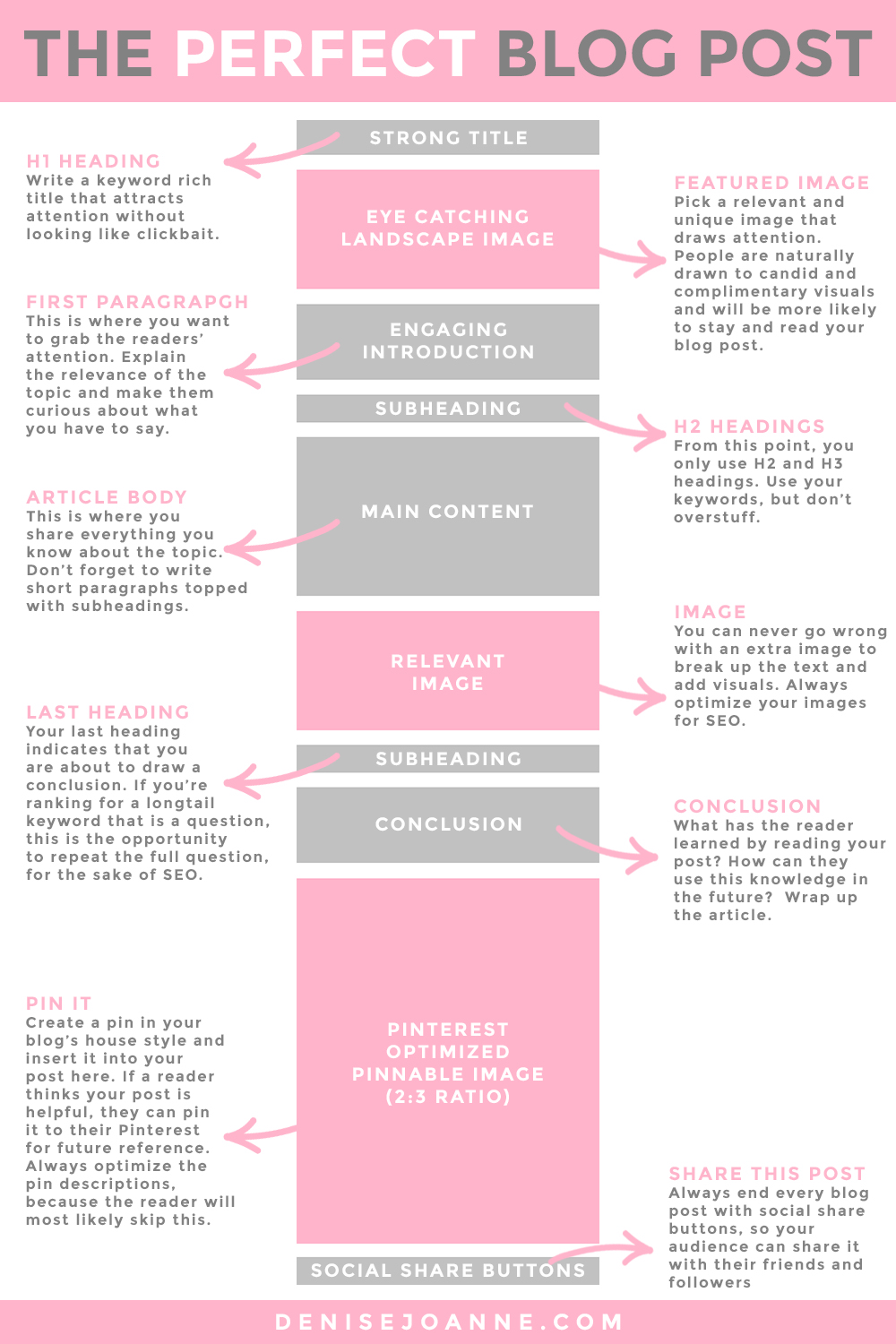
Short paragraphs, clear headings, and bullet lists help readers scan your article. Use H2 for main sections and H3 for sub-sections. Break long sections into smaller chunks with sub-headings.
Use white space—don’t crowd your text. On mobile devices, big blocks of text are hard to read. Also, use images, tables, or quotes to break up content and add visual interest.
Table Example: Article Structure Comparison
Here’s a quick comparison of three common blog structures:
| Structure Type | Best For | Key Features |
|---|---|---|
| List Article | Quick tips, tools | Numbered points, easy to scan |
| How-To Guide | Tutorials, step-by-step | Clear steps, actionable advice |
| Comparison | Product reviews | Side-by-side features, pros/cons |
Non-obvious insight: Beginners often forget to use sub-headings. Sub-headings break up long sections and help SEO. Also, don’t be afraid to add a “Frequently Asked Questions” or “Summary” section if it helps readers.
Another detail: use anchor links for very long articles. These links let readers jump to different sections quickly. This is especially helpful in guides or resource lists.

Researching And Gathering Information
Good research makes your article trustworthy. Readers want facts, examples, and real data—not just opinions.
Where To Find Reliable Information
- Official Websites: Government, universities, industry leaders. These are usually the most trustworthy sources for data or rules.
- Research Papers: Google Scholar, PubMed. For scientific or technical topics, research papers are essential.
- Statistics Portals: Statista, Pew Research. Use these for up-to-date numbers and trends.
- Interviews: Experts, professionals, users. Adding quotes or advice from real people adds authority.
- Industry Reports: Whitepapers, annual reports, and surveys from respected companies.
- Books: Often overlooked, but books can provide deeper background and unique insights.
- Your Own Experience: If you have real results or stories, share them. Readers trust writers who speak from experience.
How To Avoid Common Mistakes
- Never rely on one source. Cross-check facts. If two or more trusted sources agree, the information is likely reliable.
- Use the latest data. Outdated information lowers trust. For example, using a 2015 statistic in 2024 makes your article look old.
- Give credit. Link to sources and mention where your data comes from. This builds trust and helps readers check your facts.
- Avoid Wikipedia for critical facts. It’s useful for background, but always check the references.
- Don’t copy other blogs. Use your research to add your own insights.
Data Example: Blogging Statistics
In 2023, there were over 600 million blogs worldwide. Every day, more than 7 million blog posts are published. Yet, only about 30% of bloggers report strong traffic (Source: Statista).
Adding numbers like these makes your article more credible and interesting. If you can find data for your niche, include it.
Table Example: Common Research Sources
| Source | Reliability | Best Use |
|---|---|---|
| Wikipedia | Medium | Background info |
| Official Websites | High | Primary data |
| Blogs | Varies | Opinions, experiences |
| Research Papers | High | Scientific evidence |
Non-obvious insight: Many bloggers forget to check the date of their sources. Data older than two years can make your article look outdated. Also, don’t just link to sources—summarize what’s important for your readers.
Another tip: if you use a chart or table, explain what it means. Don’t assume readers will understand the significance of the numbers.
Writing Clear And Engaging Content
Now, it’s time to write. The best blog articles are easy to read, engaging, and helpful. Here’s how to write content that stands out.
Use Simple Language
- Short sentences: Aim for 15–20 words per sentence. Short sentences are easier to read, especially for non-native speakers.
- Common words: Avoid jargon and complex vocabulary. If you need to use a technical term, explain it.
- Active voice: “You can start a blog” instead of “A blog can be started.” Active voice is more direct and lively.
- Avoid filler words: Cut out words like “very,” “really,” and “just” if they don’t add meaning.
- Check for clarity: After writing, ask yourself, “Would my friend understand this sentence?”
Keep Paragraphs Short
- 2–4 sentences per paragraph is ideal.
- Short paragraphs make reading easier, especially on mobile.
- Break up long ideas into separate paragraphs for easier scanning.
Make It Engaging
- Use stories or examples. People remember stories better than facts alone.
- Ask questions to involve readers. Example: “Have you ever struggled to finish an article?”
- Add quotes or real-life experiences. Even a short quote from an expert adds authority.
- Use humor or emotion if it fits your style. A light joke or a personal struggle can make your article memorable.
Avoid Common Mistakes
- Don’t repeat the same idea in different ways. Each sentence should add something new.
- Don’t use filler words (“very,” “really,” “just”) unless they add meaning.
- Don’t write too much without breaking up text with headings or lists.
- Don’t change tense or point of view randomly. Pick one (usually present or past) and stick with it.
- Don’t write long, complicated sentences unless needed for clarity.
Example: Before And After
Before:
“Blogging is an important activity that many people use to share their ideas and opinions on the internet, and it can be done by anyone who wants to create a website and write articles. ”
After:
“Blogging lets you share your ideas online. Anyone can start a blog and write articles. ”
Notice how the second version is shorter, clearer, and easier to read. This is what you should aim for.
Non-obvious insight: Many writers use passive voice without noticing. Passive sentences are harder to read and less engaging. Run your text through a tool like Hemingway App to spot passive voice and long sentences.
Another tip: read your article out loud. If you trip over a sentence, it’s probably too complicated.
Adding Visuals And Media
Images, videos, and charts make your article more interesting. They help explain ideas and keep readers engaged.
Types Of Visuals To Use
- Photos: Show real examples or add color. Use your own photos or find free, high-quality images on sites like Unsplash or Pixabay.
- Infographics: Summarize data or steps. Tools like Canva let you create simple infographics.
- Charts/Tables: Compare information easily. Visuals help explain numbers or options quickly.
- Videos: Tutorials or interviews. A short video can explain what takes paragraphs to write.
- Screenshots: Show exactly what to do, step by step. Great for tutorials.
- GIFs: Short animations can add fun or show a process.
How To Choose The Right Visuals
- Pick visuals that support your main point. Don’t add images just to fill space.
- Make sure images are high quality and load quickly. Large images slow down your site.
- Use original visuals when possible (screenshots, custom graphics). Unique visuals set your article apart.
- Add descriptive captions. Explain what each visual shows and why it matters.
- Use consistent style and colors for all visuals in the article.
Example: Using A Table To Explain Data
If you’re comparing blogging platforms, a table helps readers see differences fast.
| Platform | Ease of Use | Cost | Best For |
|---|---|---|---|
| WordPress | Medium | Free/Paid | All levels |
| Wix | Easy | Free/Paid | Beginners |
| Blogger | Easy | Free | Personal blogs |
If you’re explaining a process, a simple flowchart or step-by-step graphic can help.
Non-obvious insight: Many beginners forget to check image size. Large images slow down your site and hurt SEO. Use free tools like TinyPNG to compress images before uploading.
Another detail: always add “alt text” to images. This helps visually impaired readers and improves SEO.
Optimizing For Seo
Search engine optimization (SEO) helps your article get found in Google and other search engines. A perfect blog article balances writing for humans and SEO.
Basic Seo Steps
- Keyword Placement: Use your main keyword in the headline, first paragraph, and headings. Don’t force it—make it natural.
- Meta Description: Write a summary (150–160 characters) that includes your keyword. This appears in search results.
- Internal Links: Link to other articles on your blog. This keeps readers on your site longer and improves SEO.
- External Links: Link to trusted sources. For example: Wikipedia.
- Image Alt Text: Describe images using keywords. For example, “WordPress dashboard screenshot.”
- Short URLs: Keep article URLs short and use keywords.
- Mobile Optimization: Make sure your article looks good on phones and tablets. Google now uses mobile-first indexing.
Avoid Keyword Stuffing
Don’t repeat keywords too often. Google can penalize overuse. Use synonyms and related phrases. For example, instead of repeating “perfect blog article,” use “great blog post,” “well-written blog,” or “quality content. ”
Example Of Optimized Paragraph
“Learning how to write a perfect blog article can boost your traffic and grow your audience. In this guide, you’ll discover easy steps for writing clear, engaging, and SEO-friendly blog posts. ”
Notice how the main keyword appears naturally.
Common Seo Mistakes
- Ignoring meta descriptions.
- Not using headings correctly. Use H2 for main sections and H3 for sub-sections.
- Forgetting to add alt text to images.
- Using duplicate content. Every article should be unique.
- Ignoring mobile optimization.
Data: Seo Impact
According to HubSpot, 72% of marketers say relevant content is the most effective SEO strategy. Well-optimized articles get up to 55% more traffic than non-optimized articles.
Non-obvious insight: Many bloggers forget to check their article’s readability score. Tools like Hemingway or Grammarly can help make your writing clearer.
Another tip: After publishing, use Google Search Console to track which keywords your article ranks for. This can help you improve future articles.
Creating A Strong Introduction
Your introduction is your first chance to grab attention. If it’s boring or unclear, readers leave. A perfect introduction hooks readers and tells them what to expect.
How To Write A Great Introduction
- Start with a question, surprising fact, or bold statement. Example: “Did you know most blogs fail in their first year?”
- Explain why the topic matters. Tell readers why they should care.
- Tell readers what they’ll learn. Set clear expectations.
- Keep it short—3–5 sentences is usually enough. Long introductions lose readers.
- Use “you” to make it personal.
Example: Effective Introduction
“Every day, millions of blog articles are published. But only a few become popular. What’s the secret? In this guide, you’ll learn how to write blog posts that stand out and get noticed. ”
Common Mistakes
- Starting with a generic sentence (“Blogging is important…”)
- Making introductions too long.
- Not telling readers what the article covers.
- Using technical terms without explanation.
Non-obvious insight: Many beginners forget to address the reader directly. Using “you” makes introductions more personal.
Another trick: write your introduction after finishing the article. This helps you focus your opening and match it to the content.
Developing Main Body Content
The body of your article is where you deliver your promise. Every section should add value and keep readers interested.
How To Build Strong Sections
- Use H2 headings for main topics.
- Use H3 headings for sub-topics.
- Add examples, data, and actionable advice.
- Start each section with a clear topic sentence. Tell readers what to expect.
- End with a quick summary or key takeaway.
Keep The Flow Logical
Arrange sections in a way that makes sense. Start with basics, move to advanced tips, then finish with bonus advice. Group similar ideas together.
If your article is very long, add a summary or “jump to” links at the top.
Example: Logical Section Flow
- What is Blogging?
- Why Blogging Matters?
- How to Start a Blog?
- Common Mistakes
- Advanced Tips
This order helps readers build knowledge step by step.
Use Transition Sentences
Help readers move from one idea to the next. For example: “Now that you know how to choose a topic, let’s look at writing your article.”
Transitions connect your ideas and keep readers engaged.
Non-obvious insight: Many bloggers forget to summarize key points at the end of each section. A quick recap helps readers remember.
Another detail: Add “pro tips” or “common mistakes” boxes to make your article more practical.
Writing A Memorable Closing
The closing paragraph wraps up your article. It should encourage readers to take action, share, or comment.
How To Write A Strong Closing
- Summarize main points. Remind readers what they learned.
- Encourage readers to act (“Start your blog today!”)
- Ask for feedback or comments. This builds community and engagement.
- End on a positive, motivating note.
Example: Actionable Closing
“You now have the tools to write a perfect blog article. Try these steps, and see how your writing improves. If you have questions, share them below. ”
Common Mistakes
- Ending with a weak sentence.
- Not inviting readers to engage.
- Forgetting to summarize.
- Adding new information in the closing.
Non-obvious insight: Many bloggers forget to add a clear call-to-action. Without it, readers don’t know what to do next.
Another tip: personalize your closing. For example, “I’d love to hear your thoughts—what’s your biggest blogging challenge?”
Editing And Proofreading
Editing is as important as writing. Mistakes can ruin a great article. Proofreading ensures your article is clear and error-free.
Steps For Effective Editing
- Take a Break: Wait a few hours before editing. Fresh eyes spot more mistakes.
- Read Aloud: Hearing your words helps catch awkward sentences.
- Check for Clarity: Make sure every sentence is easy to understand.
- Use Tools: Grammarly, Hemingway, or ProWritingAid can help.
- Edit in Rounds: First, check content and structure. Then, fix grammar and spelling. Finally, check formatting and links.
- Ask for Help: If possible, ask a friend or colleague to review your article.
Proofreading Checklist
- Spelling and grammar errors
- Repeated words or phrases
- Unclear sentences
- Proper heading structure
- Broken links or images
- Consistent style (tense, point of view)
Example: Editing Tools Comparison
| Tool | Features | Best For |
|---|---|---|
| Grammarly | Grammar, clarity, suggestions | All writers |
| Hemingway | Readability, sentence structure | Simple writing |
| ProWritingAid | Style, structure, grammar | Advanced editing |
Non-obvious insight: Many beginners edit only once. Multiple rounds of editing catch more errors.
Another tip: print your article and edit on paper. You’ll catch mistakes you miss on screen.
Formatting For Readability
Good formatting makes your article easier to read. It also helps with SEO and keeps readers on your page longer.
Essential Formatting Tips
- Use bold for key terms.
- Add bullet lists for quick tips.
- Keep paragraphs short.
- Use headings and sub-headings.
- Add white space between sections.
- Use blockquotes for important points or quotes.
- Highlight key takeaways in boxes or bold text.
Formatting Example
Instead of long blocks of text, break information into lists:
- Choose a clear topic.
- Write short sentences.
- Add examples and visuals.
- Edit carefully.
Common Mistakes
- No headings or too few.
- Long paragraphs.
- Lack of visual elements.
- Inconsistent font sizes or colors.
Non-obvious insight: Many bloggers forget to check formatting on mobile. What looks good on desktop can be hard to read on phones.
Another detail: use a clear, easy-to-read font. Avoid fancy or small fonts that make reading harder.
Adding Calls-to-action
A call-to-action (CTA) tells readers what to do next. Without a CTA, your article feels unfinished.
Types Of Ctas
- Subscribe: “Sign up for our newsletter.”
- Comment: “Share your thoughts below.”
- Share: “Send this article to a friend.”
- Buy: “Get our ebook now.”
- Download: “Download the free checklist.”
- Follow: “Follow us on social media for more tips.”
How To Write Effective Ctas
- Be clear and direct.
- Use action verbs (“Start,” “Join,” “Share”).
- Offer value (“Get tips,” “Download free guide”).
- Make CTAs stand out visually (bold, buttons, or boxes).
Cta Example
“If you found this guide helpful, subscribe for more blogging tips!”
Or:
“Have a question about blogging? Leave a comment below—I reply to every one!”
Common Mistakes
- Too many CTAs in one article.
- Vague CTAs (“Click here” without explaining why).
- CTAs buried at the bottom without emphasis.
- Not tracking which CTAs get results.
Non-obvious insight: Many beginners forget to test CTAs. Check if people actually click or engage.
Another trick: try different CTAs and see which works best for your audience.
Promoting Your Blog Article
Writing is only the first step. Promotion helps your article reach more people.
Where To Promote
- Social Media: Facebook, Twitter, LinkedIn
- Email Newsletters: Send articles to your list
- Online Communities: Reddit, Quora, forums
- Guest Posts: Write for other blogs and link back
- Content Aggregators: Sites like Medium or Flipboard
- Messenger Apps: Share with WhatsApp or Telegram groups
- Pinterest: Especially useful for travel, food, or DIY topics
Promotion Checklist
- Share on all platforms.
- Use hashtags for visibility.
- Tag relevant people or brands.
- Respond to comments.
- Reshare articles later (e.g., one month after publishing).
- Repurpose content (turn articles into videos, infographics, or podcasts).
Data: Promotion Impact
According to Orbit Media, bloggers who promote their articles on multiple platforms get up to 300% more traffic.
Non-obvious insight: Many bloggers forget to update old articles and re-promote them. Fresh content performs better.
Another tip: schedule social media posts at different times to reach a larger audience.
Measuring Article Performance
Tracking performance helps you improve future articles. You need to know what works and what doesn’t.
Key Metrics To Watch
- Page Views: How many people read your article?
- Time on Page: How long do readers stay?
- Bounce Rate: How many leave after one page?
- Social Shares: How often is your article shared?
- Comments: Are readers engaging?
- Click-Through Rate (CTR): How many readers click your links or CTAs?
- Conversion Rate: How many readers subscribe, buy, or take another action?
Tools For Measurement
- Google Analytics: Tracks views, time, bounce rate.
- Social Share Plugins: Counts shares.
- Comment Systems: Tracks engagement.
- Heatmaps: Tools like Hotjar show where readers click or scroll.
Example: Performance Metrics Table
| Metric | Why It Matters | Improvement Tips |
|---|---|---|
| Page Views | Shows popularity | Promote more |
| Time on Page | Shows engagement | Add visuals, break text |
| Bounce Rate | Shows retention | Improve intros, add links |
| Comments | Shows interaction | Ask questions, reply |
Non-obvious insight: Many bloggers only check page views. Time on page and bounce rate show real engagement.
Another detail: set goals in Google Analytics (like downloads or sign-ups) to measure article success.
Updating And Improving Old Articles
Perfect blog articles aren’t just written once. Updating old posts keeps them relevant and boosts SEO.
Why Update Old Content?
- New data or trends
- Fix outdated information
- Improve SEO rankings
- Add new examples or visuals
- Answer new reader questions
- Reflect changes in your industry or niche
How To Update
- Check for outdated facts or broken links.
- Add new sections or tips.
- Improve formatting and readability.
- Re-promote the updated article.
- Change the publish date or add “Last updated” notes.
- Optimize for new keywords if needed.
- Update images or add new visuals.
Data: Update Impact
Backlinko found that updating old articles can increase traffic by up to 50%.
Non-obvious insight: Many bloggers forget to change the publish date or add “Last updated” notes. This shows readers your content is fresh.
Another tip: ask your audience what topics need updates or what questions they have.
Building Consistency
Writing one perfect article is good. Writing consistently is even better. Consistency builds trust and grows your audience.
How To Build A Writing Routine
- Set a schedule: Weekly, biweekly, or monthly.
- Plan topics ahead.
- Create templates for structure.
- Track your progress.
- Batch similar tasks (e.g., research for several articles at once).
Benefits Of Consistency
- Better SEO rankings
- More loyal readers
- Easier promotion
- Builds authority in your niche
- More opportunities for feedback and improvement
Common Mistakes
- Writing only when inspired.
- Not planning topics.
- Skipping edits to save time.
- Publishing too often and burning out.
Non-obvious insight: Many bloggers set unrealistic goals. Start with what you can manage, then scale up.
Another detail: use a content calendar to plan articles, promotions, and updates.
Personalizing Your Writing Style
Your style sets you apart. Perfect articles reflect your personality and connect with readers.
How To Develop Your Style
- Write as you speak.
- Use stories from your life.
- Add humor or emotion.
- Be honest—share failures as well as wins.
- Use consistent language, tone, and formatting.
Example: Personal Touch
“Last year, I struggled to grow my blog. But after applying these tips, my traffic doubled. Here’s what I learned. ”
Sharing personal wins and losses builds trust.
Common Mistakes
- Copying other writers.
- Using overly formal language.
- Hiding your personality.
- Switching styles in the same article.
Non-obvious insight: Many bloggers forget that their unique voice is their biggest asset.
Another tip: ask friends how they describe your style. Use their feedback to strengthen your writing voice.
Handling Writer’s Block
Even the best writers get stuck. Writer’s block can delay articles and hurt consistency.
How To Beat Writer’s Block
- Set small goals (“Write 100 words today”).
- Change your environment.
- Use prompts or outlines.
- Take breaks and relax.
- Write without editing—fix mistakes later.
- Read articles in your niche for inspiration.
Example: Quick Prompts
- What’s the biggest mistake beginners make?
- What tool saves you the most time?
- What would you tell your past self?
- What’s a recent lesson you learned?
Common Mistakes
- Waiting for inspiration.
- Not having a plan.
- Trying to write perfectly on the first try.
- Comparing yourself to others.
Non-obvious insight: Many bloggers forget that rough drafts are okay. Editing makes articles perfect later.
Another detail: try “freewriting”—write nonstop for 10 minutes. You’ll often find new ideas.
Leveraging Feedback
Feedback improves your articles. Listening to readers helps you write better and build community.
How To Get Feedback
- Ask readers for comments.
- Run surveys or polls.
- Use analytics to spot trends.
- Join online writing groups for peer review.
- Ask direct questions at the end of articles (“What did you find most useful?”).
How To Use Feedback
- Improve clarity.
- Add requested topics.
- Fix common complaints.
- Update articles based on repeated questions.
Example: Feedback Impact
If readers say your articles are too long, try shorter posts. If they want more examples, add stories.
Non-obvious insight: Many bloggers ignore negative feedback. Criticism helps you grow.
Another tip: thank readers who give feedback—this builds loyalty.
Making Your Article Shareable
A perfect blog article is easy to share. More shares mean more traffic and visibility.
How To Encourage Sharing
- Add share buttons.
- Write catchy headlines.
- Use visuals that stand out.
- Mention influencers or brands.
- Add “tweetable” quotes or facts.
- Suggest sharing at the end (“If you liked this, share with a friend!”).
- Create unique graphics for social media.
Example: Shareable Elements
- “Share this article if you found it helpful.”
- “Tag a friend who needs these tips.”
- “Pin this infographic for later.”
Common Mistakes
- No share buttons.
- No mention of sharing.
- Bland headlines.
- Not optimizing images for social platforms.
Non-obvious insight: Many bloggers forget to ask for shares directly. A simple request increases sharing.
Another detail: add Open Graph and Twitter Card tags so your article looks good when shared.
Frequently Asked Questions
What Is The Ideal Length For A Blog Article?
The best length depends on your topic and audience. Research shows articles between 1,500 and 2,500 words perform well for SEO. However, longer, in-depth guides can rank higher if they offer real value. Always focus on quality over quantity.
For topics that need more detail, don’t be afraid to go over 3,000 words. Just make sure every section is useful and well-structured. If your readers prefer quick tips, shorter articles (500–1,000 words) may work better.
How Often Should I Publish New Blog Articles?
Consistency is more important than frequency. Most successful blogs publish once a week or every two weeks. Choose a schedule you can maintain, and stick to it. Quality matters more than rushing out posts.
If you’re busy, publishing once a month is fine. Just keep your readers informed about your schedule.
What Are The Most Common Mistakes Beginners Make?
Beginners often choose topics that are too broad, use complicated language, skip editing, and forget to promote their articles. They also sometimes ignore SEO basics, which can hurt their visibility.
Other mistakes include not understanding their audience, writing only when inspired, and copying other blogs instead of developing their own voice.
How Can I Make My Blog Article Stand Out?
Focus on unique insights, clear structure, and simple language. Use visuals, add personal stories, and optimize for SEO. Engage readers with questions and calls-to-action, and update your articles regularly.
Also, share your own experiences and lessons learned. Readers remember stories more than lists of tips.
Do I Need To Use Images Or Videos In Every Article?
You don’t need visuals in every article, but they help make your content more engaging and easier to understand. Images, charts, and videos can clarify your points and keep readers interested, especially for complex topics.
If you can’t find a relevant image, use a simple chart, a quote, or a custom graphic.
Final Thoughts
Writing the perfect blog article takes practice, patience, and planning. It’s about understanding your audience, picking the right topic, and structuring your article for clarity. Every step, from headline to closing, matters. Use simple language, add visuals, optimize for SEO, and edit carefully.
Promote your article, track its performance, and update it as needed. Consistency and feedback will make you better over time.
Most important, let your personality shine through. Your unique voice is what makes your blog memorable. Start applying these tips today—and watch your blog articles become more effective, shareable, and impactful.